The short answer
Yes, and it can be a lot more than you'd expect. A sleep tracking app that uses your phone's accelerometer and microphone all night, watching for movement and listening for snoring, can pull anywhere from 15% to 30% of a battery over eight hours. Some people wake up to a phone at 40% after going to bed at 95%. An app that simply plays audio to help you fall asleep, with the screen off and the sensors idle, uses a fraction of that. The gap between the two is the whole story.
Why tracking drains so much more than playback
A phone's operating system wants to sleep too. When nothing is asking for the accelerometer, the microphone, or a live screen, iOS and Android drop into low power states between tasks, waking briefly to handle a notification or a timer, then going quiet again. A tracking app breaks that rhythm on purpose. It polls the accelerometer every few seconds to log how much you're moving. Some versions keep the microphone recording for hours to catch snoring or talking. That keeps the processor semi-awake all night, which is the opposite of what a resting phone, or a resting person, wants to be doing.
Playing a track is a much lighter job. Once the audio is loaded, the CPU can idle almost completely and just hand small chunks of sound to the speaker or headphones on a schedule. The screen can go black. No sensor is being asked anything. This is why a three-hour looped soundscape barely dents a battery, while three hours of motion-and-audio tracking can drain it fast enough to matter.
What most articles about this get wrong
Most posts on this topic treat "sleep app" as one category, when it's really two very different jobs wearing the same label. One kind measures you: movement, sound, sometimes heart rate through a paired wearable. The other kind is there to help you fall asleep in the first place, through music, ambient sound, or a wind-down routine, and doesn't need to know anything about what you're doing once you're under. If your battery is disappearing overnight, the first question isn't "do sleep apps drain battery" in general, it's which kind of app you're actually running, and what it's doing with your sensors while you're unconscious.
The exceptions that make it worse
A few things turn ordinary drain into a real problem. An older phone with a battery that's lost 20% of its original capacity will show any drain more dramatically, because the total pool is smaller. Weak wifi or a poor signal makes a streaming app work harder, repeatedly trying to reconnect, which burns power even when no audio is playing. Screen brightness left high overnight, especially with an app that shows a live moving graph, keeps the display drawing power for hours instead of going dark after thirty seconds. And background app refresh, left on for apps that don't need it, lets things run checks you never asked for while you sleep.
What to actually change tonight
None of this requires giving up on using your phone at bedtime. A few small habits fix most of the drain:
- Download tracks for offline playback instead of streaming, so the radio isn't working to hold a connection all night.
- Set a timer so audio stops after 45 to 60 minutes rather than looping until morning. Most people are asleep well before that.
- Turn the screen brightness right down, or use a wind-down screen designed for low light rather than a bright graph or video.
- If you don't need overnight tracking, turn off motion and microphone permissions for that app specifically rather than leaving them on by default.
How this app handles it differently
My Zen Zone is a music library, not a tracker, and that distinction matters for your battery as much as for your ears. There's no microphone listening for snoring, no accelerometer logging how many times you turned over. You pick a track, or build your own mix, and the phone is free to do what it does best at night: very little.
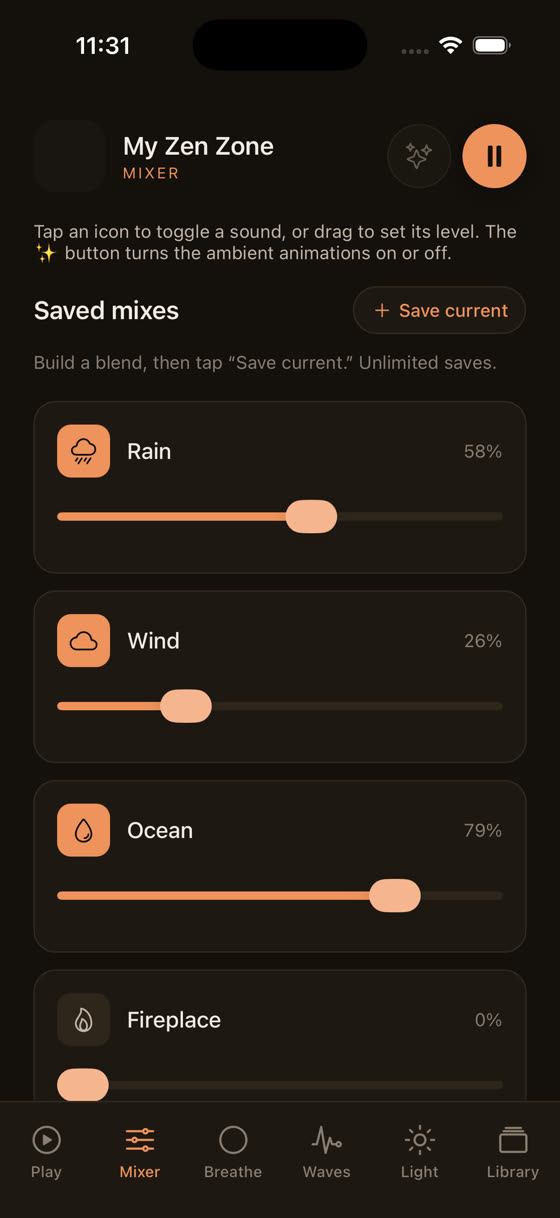
The mixer lets you layer three nature sounds, rain, waves, low drone, at three separate levels, so you're not running one app for sound and another for tracking and a third for white noise. One thing playing, screen dark, sensors untouched.
Watching the levels move live is the fastest way to understand why this beats a fixed playlist: you're not choosing between five preset "rain sounds" tracks, you're setting your own balance and saving it. A sleep timer stops everything after the length you choose, so the phone isn't pushing audio to a room you've already left for sleep three hours ago. And every track you use can be downloaded ahead of time, which means no streaming, no reconnect attempts, no radio working through the night to keep a connection alive.
If you still want to track your sleep
Tracking isn't pointless, but it's worth being honest about the trade-off. A phone-based accelerometer under your pillow or on the mattress is going to cost you battery every single night, because it's asking the hardware to do a job it wasn't built to do quietly. A wearable that offloads the sensing to a wrist device and syncs briefly in the morning is far gentler on the phone, because the phone itself is doing almost nothing until you wake it. If you don't have a wearable, tracking every third or fourth night rather than nightly is a reasonable middle ground, and it still gives you a rough pattern without the daily battery cost.
Charging overnight isn't the same problem
Worth separating out: leaving your phone on the charger all night is a different issue to drain, and mostly a non-issue on modern phones, which stop pulling current once they hit full charge and trickle-feed after that. The battery anxiety around sleep apps is usually about phones that aren't on a charger, sitting on a nightstand, expected to still have enough charge left for an alarm at 6am. If you're worried, plug in before you start your wind-down routine rather than after, so the drain from an hour of audio doesn't matter either way.
The simpler fix underneath all of this
A lot of the appeal of sleep tracking is really a want for reassurance, some evidence that last night worked. Music and a calm screen do a different, more direct job: they help you get to sleep in the first place, which matters more than measuring it afterwards. If you're choosing between a phone doing analysis all night and a phone playing something calm on a loop, the second option is both easier on the battery and, for most people, more useful before eyes are closed. If you want more on what actually works for winding down, this piece on the best music for sleep goes into tempo and instrumentation in more detail. And if the same battery logic applies to your work day, streaming background audio while you concentrate, the focus and study post covers the same offline-download habit for daytime use.
A short checklist before bed
If you take one thing from this, make it a routine rather than a rule you'll forget by Thursday. Download what you'll listen to before you get into bed. Set a sleep timer instead of trusting a loop to run all night. Turn off tracking permissions for anything you're not actively using. Dim the screen, or better, don't look at it once the audio starts. None of this needs a new app. It just needs the one you already have to do less while you sleep, which, it turns out, is also the point of the exercise. You can see the full library, mixer, and timer for yourself at myzenzone.app, or go straight to the download page if you'd rather just try it tonight.
Common questions
Will using a sleep sound app every night damage my phone's battery long term?
Playing audio at moderate volume with the screen off is low-stress on a battery and won't meaningfully speed up its long-term wear. What does age a battery faster is heat, so avoid leaving the phone under a pillow or blanket while it plays or charges, since trapped heat is harder on battery health than the playback itself.
Does airplane mode help with battery drain overnight?
Yes, if you've downloaded what you need beforehand. Airplane mode stops the radio from searching for signal or holding a wifi connection, which is one of the bigger hidden battery costs overnight. Just make sure your alarm doesn't rely on an internet connection, and that any audio you want is already downloaded to the device.
Is it bad to leave my phone charging next to my bed all night?
Modern phones stop drawing full current once charged and switch to a trickle, so it isn't a battery health problem in itself. Some people prefer distance from the phone for their own comfort or sleep hygiene reasons, which is a personal preference rather than a technical requirement.
Why does my phone get warm when a sleep app is running overnight?
Warmth usually means the processor is staying more active than it needs to, often because of continuous sensor polling, microphone recording, or a struggling network connection while streaming. An app that just plays a downloaded file with the screen off should stay close to room temperature all night.
Should I close background apps before using a sleep app?
It rarely makes a meaningful difference on modern phones, since the operating system already limits what backgrounded apps can do. The bigger wins are downloading audio in advance, dimming the screen, and setting a sleep timer, rather than manually closing apps each night.