Yes, a white noise lite app uses data whenever it streams sound rather than plays a file already saved on your phone. The word "lite" refers to the size of the app itself, not what happens once you press play. If you're streaming eight hours of rain or static overnight on a standard connection, you can burn through 300 to 500 megabytes without noticing, and that's before you account for the ads that most lite apps run to stay free.
The actual numbers, worked out
Audio data usage comes down to bitrate times time. A typical streamed white noise track sits somewhere between 96 and 192 kbps. Take 128 kbps as a rough middle ground: that's 16 kilobytes a second, which works out to roughly 57 megabytes an hour. Multiply that by a full night's sleep and you're looking at 400 to 460 megabytes for eight hours of continuous streaming. Run it for a toddler's nap time twice a day, every day, and you'll clear several gigabytes a month without ever opening a video app.
Some white noise apps use lower-quality mono files, closer to 64 kbps, because static and rain don't need the frequency range that music does. That halves the number, but it's still not nothing, and it's still happening every single night if you stream rather than store the file locally.
Where lite apps quietly cost you more
Here's what most articles on this topic skip: the audio is often the smaller part of the bill. Free, ad-supported lite apps typically load banner ads, video pre-rolls, and analytics pings throughout the session. A single video ad can use more data than ten minutes of the actual noise track. Add background tracking, crash reporting, and ad-refresh cycles every 30 to 60 seconds, and a supposedly "lite" app can end up heavier on your data plan than a paid app with no ads at all. Lite refers to install size and feature count. It says nothing about what runs in the background while you sleep.
Wifi versus cellular: when this actually matters
If your phone is on wifi overnight, none of this matters for your data plan, though it still uses your router's bandwidth, which is irrelevant unless you're on a metered connection. The real cost shows up in three situations: falling asleep away from home on cellular data, using the app during a commute or flight, or living somewhere with a capped or expensive data plan. If any of those describes you, streaming audio for hours is a genuinely bad habit, not a minor inefficiency. It's one of the more overlooked line items in a phone bill.
The fix nobody mentions: download once, play forever
The straightforward solution is to stop streaming and start downloading. Any track saved to your device plays from storage, using zero data no matter how many times or how many hours you play it. This is the single biggest lever, and it's worth checking whether the app you're using actually supports it, because a lot of lite apps deliberately don't, since ad revenue depends on you staying connected.
In My Zen Zone, every track in the library can be downloaded for offline listening, so a night of sleep, a work session, or a flight with no wifi costs you nothing in data once the download is done. That matters more than people expect: you set it up once on wifi at home, and then the app behaves exactly the same on a plane, in a basement gym, or in a rental with terrible signal.
Why a single noise loop isn't the same as a mixed soundscape
Most white noise apps, lite or otherwise, give you one sound at a fixed volume: rain, or fan noise, or static. That's fine, but it's also a big part of why people get bored of them after a few weeks and go looking for something else, restarting the streaming cycle all over again. A soundscape that actually holds your attention over months tends to layer two or three sounds so the ear has more to settle into.
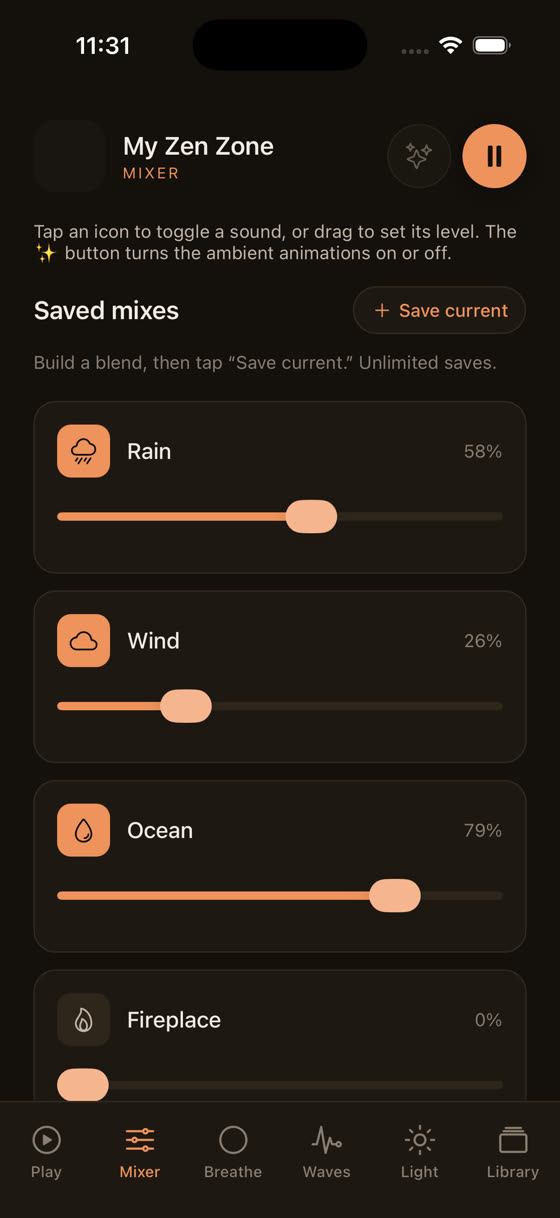
This is where a proper mixer earns its keep. Instead of one static loop, you set rain at one level, distant thunder lower, and a soft drone underneath, each with its own slider.
Watching those three levels move independently makes the difference obvious: it's not louder or quieter noise, it's a different balance of sound entirely, which is a big part of why a mixed track holds attention through a full night instead of turning into background you tune out after ten minutes.
What actually helps you fall asleep, data aside
Setting the data question to one side for a moment, it's worth asking whether generic white noise is even the right tool. Plain static works for masking sudden sounds, a snoring partner, traffic, a noisy radiator, but it doesn't do much to slow your body down. Music built around 60 to 70 beats per minute, close to a resting heart rate, gives your nervous system something to entrain to, which is a different mechanism than simple masking. We've written more on the mechanics of this in our piece on the best music for sleep, but the short version is that a slow, repetitive tempo with no sudden dynamic changes does more of the work than volume or noise type alone.
The same logic applies during the day
Data usage isn't only a bedtime concern. If you're using background sound to concentrate at a desk or in a shared office, the same streaming costs apply, just compressed into shorter bursts across a workday instead of one long overnight session. Music for focus tends to want fewer surprises than sleep music, no swelling strings, no big dynamic shifts, just a steady bed of sound that doesn't pull attention away from whatever you're doing. If that's your use case, our piece on music for focus and study goes into tempo and structure choices in more detail. Either way, downloading tracks in advance solves the data question for both contexts at once.
What to actually do tonight
Practically, here's the sequence that avoids the whole problem. Open whatever app you're using while still on wifi. Find the download or offline option, if it has one. Download the specific tracks or session you plan to use for the next week, not just one, since you'll want variety. Then switch your phone to airplane mode or turn off mobile data before bed, which has the side benefit of stopping notifications too. From that point on, the app runs entirely from local storage.
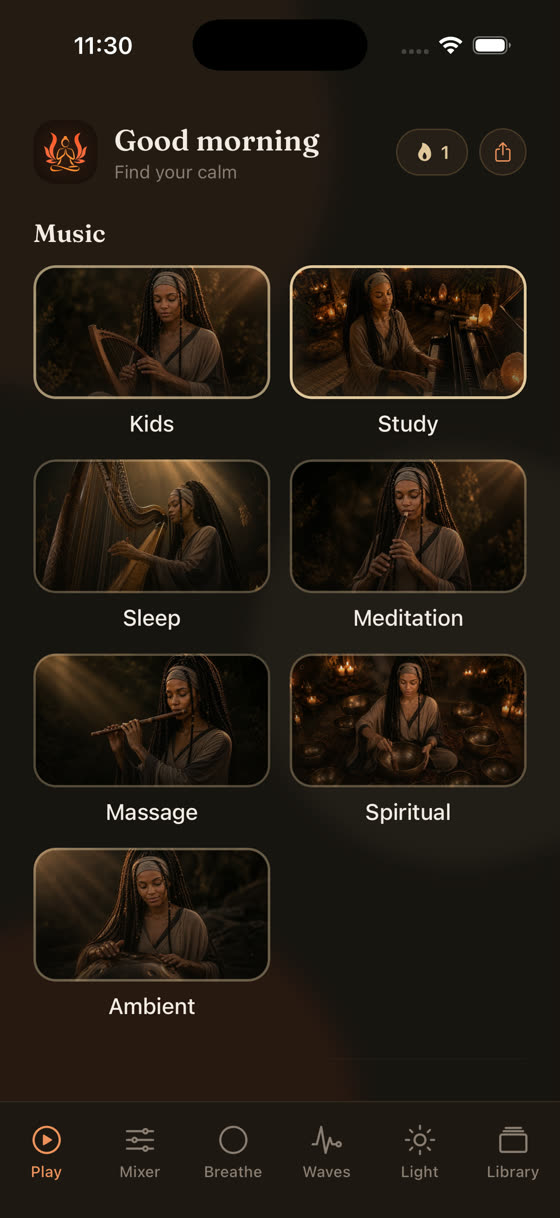
The library itself is organised by what you're trying to do rather than by sound type alone, sleep, focus, meditation, and calm each sitting as their own section, with new tracks added roughly every two weeks so the rotation doesn't go stale. If you want to see how the download and mixer options sit inside that, the fastest way is to look at the app itself or just get it and try a track offline tonight.
Common questions
Does playing white noise overnight drain my phone battery a lot?
Screen-off audio playback is fairly light on battery, but eight hours of any app running does add up. Turning the screen off, closing other apps, and using a sleep timer so playback stops automatically after an hour or two both saves battery and avoids running all night unnecessarily.
Can I download tracks once and use them on a different device?
Downloads are usually tied to the device and app install they were made on, not shared automatically across phones. If you use both a phone and a tablet, you'll need to download your tracks separately on each one while connected to wifi.
Does a sleep timer reduce data usage too?
Yes, indirectly. A sleep timer that stops playback after, say, 60 or 90 minutes means you're not streaming for a full eight hours even if you forget to switch to offline mode. It's a smaller fix than downloading, but it helps if you sometimes forget.
Is white noise better than music for actually falling asleep?
Neither is universally better; they do different jobs. White noise masks sudden environmental sounds, while slow, low-tempo music can help settle a racing mind. Many people do better combining a low layer of noise with quiet music underneath, which a mixer makes easy to balance.