Start It Once, Then Leave the Phone Alone
Here's the answer, then the reasoning. Turn off any battery restriction the phone has placed on the app, download the sound instead of streaming it, and use a loop rather than a countdown timer if you actually want noise running until you wake up. Do those three things on iPhone or Android and the sound will run all night without you touching the phone again. The moment people report - the noise cutting out at 2am, or fading into silence for no obvious reason - is almost never a bug in the app. It's the phone's power management doing exactly what it was built to do, which is kill background processes it assumes you forgot were running.
That's the whole fix in two sentences. Everything below is about why phones do this, and which specific switches to flip, because iPhone and Android handle background audio differently and most advice on this only covers one of them.
Why the Sound Actually Cuts Out at 3am
Modern phones are aggressive about battery life, and audio apps sitting in the background look, to the operating system, exactly like an app you closed and forgot about. Three things typically kill the sound partway through the night. Background app refresh gets disabled somewhere in a settings menu you never visit. The phone drops into a low-power or Doze-style state after a period of inactivity and deprioritises anything not actively on screen. Or the app is streaming rather than playing a downloaded file, and a brief wifi hiccup or a switch to cellular data breaks the connection mid-loop. None of these are dramatic failures. They're quiet, which is exactly why you don't notice until you wake up at 4am to total silence and a racing mind.
On iPhone: the Settings Worth Checking Tonight
Go to Settings, then General, then Background App Refresh, and make sure it's switched on for whatever app you're using. This one setting is responsible for more mid-night silences than anything else on iOS. Second, if you use Low Power Mode overnight to save battery, know that it can throttle background audio priority on some devices - it's usually fine, but if you're having trouble, try one night without it and see if that's the variable. Third, and this is the one people miss: Auto-Lock does not stop audio playback on its own, but a flaky Bluetooth speaker connection combined with the screen locking can sometimes cause a stutter that reads as a full stop. If you're using a Bluetooth speaker, check its own auto-off timer, which is usually set by the manufacturer to something like 15 or 20 minutes of silence - and white noise, ironically, sometimes registers as silence to a cheap speaker's detection circuit.
On Android: the Settings Worth Checking Tonight
Android's battery optimisation is more aggressive by default than iOS, and manufacturers layer their own systems on top. Open the app's settings from your phone's main Settings menu, find Battery, and set it to Unrestricted rather than Optimised. On Samsung phones specifically, check that the app hasn't been added to the "Sleeping apps" or "Deep sleeping apps" list, which is Samsung's own aggressive background killer and sits separately from the standard Android battery settings. On Xiaomi, Oppo, and a few other manufacturers, look for an "Autostart" permission and make sure it's granted. This is tedious the first time and takes thirty seconds every time after that, and it is genuinely the single biggest reason Android users report white noise stopping overnight when iPhone users with the same app rarely do.
Loop It, Don't Time It
A sleep timer is the right tool for falling asleep, not for staying asleep. If your goal is drifting off in twenty minutes and you don't want sound going all night, a timer set to 20 or 30 minutes is exactly right and saves battery. But if you're someone who wakes at every small noise, or you share a room with a partner who doesn't sleep on your schedule, a timer that cuts out at 2am can do more harm than good, because the sudden absence of sound is its own kind of disturbance. In that case, set no timer at all and let the track loop, or use a timer set to eight or nine hours so it effectively covers the whole night. Our own app gives you both options rather than forcing one - a proper sleep timer for people who want it, and unrestricted looping for people who don't.
Download It Before You Need It
Streaming is the quiet cause behind a lot of mid-night dropouts. A wifi router that reboots itself at 3am for a firmware update, a phone that switches from wifi to cellular data because the signal dipped, a data cap that throttles speeds after midnight - any of these can interrupt a streamed track in a way that has nothing to do with your settings. Downloading the track first removes that variable entirely. It also means the sound plays even in airplane mode, which is worth doing anyway overnight so notifications don't light up the screen and disturb you. New material gets added to the library every two weeks, and downloading a handful of favourites in advance means you're never caught relying on a connection at 3am. If you're deciding what to download first, the article on best music for sleep is a reasonable starting point, and the same offline logic applies whether you're playing music or straight white noise.
One Sound Isn't Always Enough
Plain white noise is a flat wash across all frequencies, which is exactly why it works for masking sudden sounds like a door or a car outside - but it can also feel thin or slightly harsh played at volume for eight hours straight. Brown noise, which is deeper and closer to the sound of distant surf, is often more comfortable for a full night. Better still is layering: a low rumble underneath, a thin rain or fan sound on top, each at a level you choose rather than accepting a single fixed mix. This is the actual difference between a basic white noise app and one built for people who want control over their environment.
Watch how each layer gets its own level, moved live, rather than being locked to one preset volume - that's the difference between a sound that's technically playing and one that's actually right for your room.
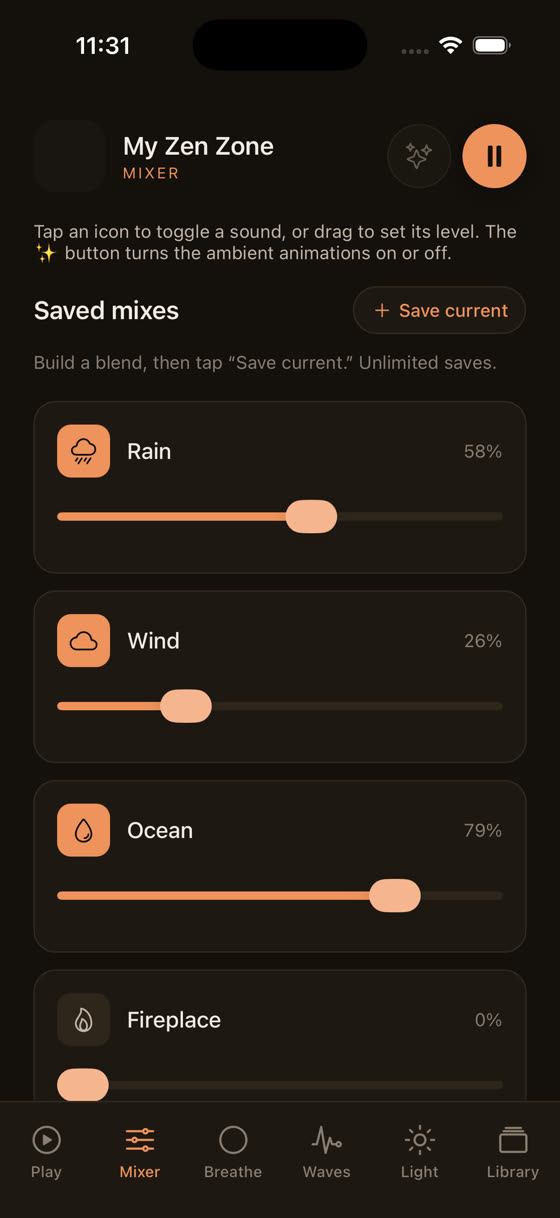
Three nature sounds sitting at three different levels, saved exactly how you left them, is a small thing until you've tried sleeping next to a partner who wants the rain louder than you do.
What To Do Tonight, in Order
Download the track or sounds you actually use, not the whole library. Set battery permissions to unrestricted on Android, or confirm Background App Refresh is on for iPhone. Decide honestly whether you want a timer or a loop, based on whether silence at 2am bothers you more or less than sound running until sunrise. Turn on airplane mode or Do Not Disturb so nothing else interrupts the audio session. Then stop adjusting things and go to sleep - the fiddling itself is often what's keeping people up, more than any technical fault. If focus rather than sleep is the actual goal, a lot of the same settings logic applies, and it's worth a look at music for focus and study for how to set up a session that runs uninterrupted through a working morning rather than a sleeping night. Either way, the app itself is built around this exact problem - offline downloads, a real mixer, a sleep timer that doesn't force itself on you - and you can see the whole thing at myzenzone.app before deciding whether it's worth the switch.
Common questions
Does running white noise all night drain the battery a lot?
Less than most people expect, especially with the screen off and the track downloaded rather than streamed. Audio playback alone is a small draw. Most of the battery loss people blame on white noise apps actually comes from the screen staying on, wifi searching for a signal, or background app refresh waking other apps too.
Is it bad to fall asleep to white noise every single night?
There's no strong evidence either way, and no medical claim to make here. Some people build a dependency on the sound and struggle without it when travelling; others find it genuinely helps mask disruptive noise. If it's working for you and you're sleeping fine, there's no established reason to stop.
Why does my Bluetooth speaker cut off white noise but the phone speaker doesn't?
Cheap Bluetooth speakers often have their own auto-off timer, usually 15 to 20 minutes of what they detect as silence. Steady white noise at a low volume can trigger this even though sound is technically playing. Check the speaker's manual for an auto-off setting, or play through the phone speaker instead.
Should I use a sleep timer or let it loop all night?
Use a timer if a sudden silence at 2am wouldn't bother you and you want to save battery. Loop it, or set the timer for 8-plus hours, if you're a light sleeper who wakes at changes in sound. There's no universally correct choice, only which kind of disturbance bothers you less.