Open the track, tap the now-playing screen, and hit the repeat icon until it switches to Repeat One. That tells Apple Music to restart the same file the instant it ends, which is the closest thing the app has to a true loop. It works, technically. But most white noise tracks in Apple's catalogue run three to ten minutes, so you'll hear the same clip restart over and over all night, often with a faint click, a half-second of silence, or a pitch jump at the seam where the loop doesn't quite close.
That's the honest answer. The rest of this is about why it happens, what actually fixes it, and what to do instead if you want sound that runs clean until morning without you thinking about it again.
The exact steps in Apple Music
If you're doing this tonight, here's the full sequence. Find a white noise or rain track, start playback, then tap the artwork to open the full-screen player. Near the bottom you'll see shuffle and repeat icons. Tap repeat once for "repeat all" in a playlist, tap it again for "repeat one," shown as a small "1" over the icon. That's the setting you want for a single looping track.
A few things trip people up here. If you've queued a whole album, repeat-one will lock you to whichever track was playing when you tapped it, not the album. If your phone auto-locks, playback continues, but double-check that Low Power Mode or background app refresh settings aren't throttling the stream, since that's a common cause of playback stopping mid-track on older phones. And if you're on cellular data rather than Wi-Fi, an eight-hour loop of a ten-minute file re-streams that file roughly 48 times, which adds up in data if the track isn't downloaded for offline listening.
Why the loop never sounds seamless
Apple Music is built to deliver songs, not to generate continuous ambient sound. Almost every white noise or nature-sound track you find there was recorded as a fixed-length clip, then mastered with a fade-in and fade-out so it behaves like a normal song. That fade is the problem. When repeat-one restarts the file, you go from near-silence at the end straight into near-silence at the start, and your ear catches the gap even if it's only a few hundred milliseconds. On tracks without a fade, you instead get a hard edit, which reads as a click or a pop.
True seamless loops are engineered differently. The waveform at the very end of the file is made to match the waveform at the very start, sample for sample, so the repeat point is inaudible. That's a specific production technique, not something that happens by accident when someone trims a ten-minute recording down from a longer session. Streaming platforms built around songs don't ask for that, so most of what you'll find there isn't made for it.
The bigger issue: one sound all night is a blunt tool
Even a perfect loop has a second limitation that has nothing to do with the seam. A single white noise track, however well it loops, is one flat layer of sound for seven or eight hours. Some people sleep fine on that. Many find it starts to feel thin after the first hour, especially if the room has its own noise, like a radiator ticking or traffic outside, that the white noise doesn't quite mask.
What tends to work better is two or three sounds at different levels, layered rather than stacked at full volume. A low rumble of rain, a touch of distant thunder, and something soft underneath it. That's a mixing decision, and Apple Music doesn't give you a mixer. It gives you one track, one volume slider, and repeat-one.
That clip shows what the alternative looks like in practice, three nature layers moving independently while a track plays underneath, each one nudged up or down in real time rather than fixed at whatever level someone else chose when they recorded it.
What My Zen Zone does differently for this exact problem
This is the gap our app was built to close. Every white noise and nature sound in the library is composed and recorded by one musician specifically to loop, with the seam engineered out rather than papered over with a fade. More importantly, you're not locked to one sound. The mixer lets you set rain, white noise, and a low drone to three separate levels at once, so the result doesn't feel like a single flat track repeating.
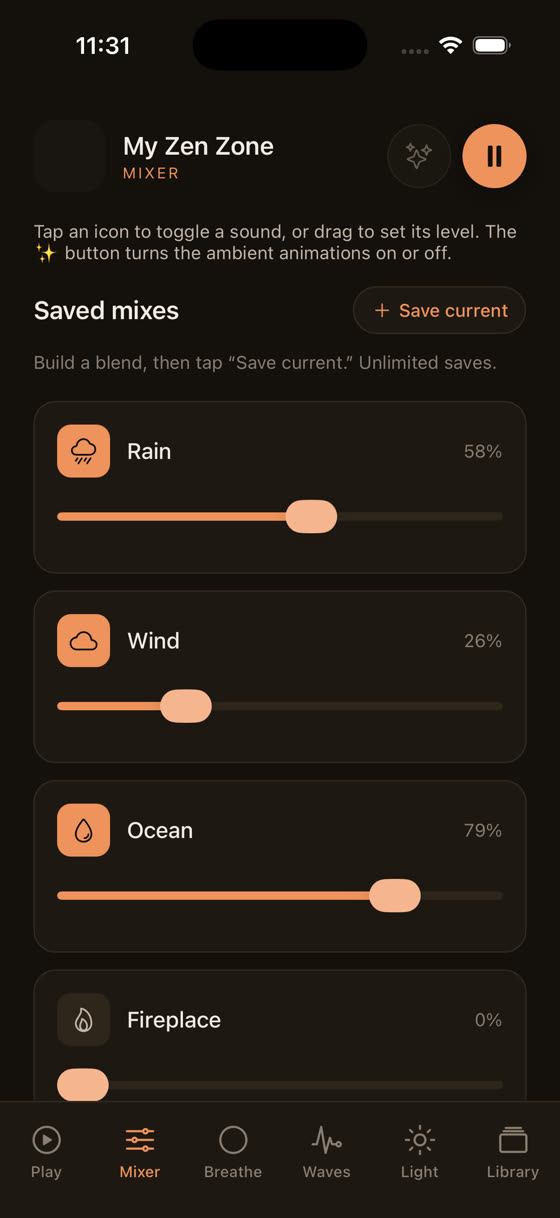
That's the screen where it happens: three sliders, three sounds, one blend that's yours rather than a preset. You can save a combination you like and come back to the same balance the next night instead of rebuilding it from memory.
Downloads matter more than people think
If your white noise is streaming over Wi-Fi all night and the connection drops, even briefly, Apple Music can stall or skip to silence, which is worse than a bad loop. Downloading the track for offline playback removes that risk entirely and also stops the repeated re-streaming that eats into your data plan on cellular.
Every track in My Zen Zone's library can be downloaded for offline use, which matters more for sleep sound than for almost anything else you'd listen to, since it's the one use case where a mid-night interruption actually wakes someone up. If you travel or keep your phone on airplane mode overnight, this is the difference between sound that holds until morning and sound that cuts out at 3am for no obvious reason.
Set it and actually forget it, with a sleep timer
Looping forever isn't always what you want either. A built-in sleep timer that fades the sound out after 45 or 90 minutes, rather than running all night, suits people who fall asleep quickly and don't want sound playing into their deep sleep cycles for hours after they're out. Apple Music doesn't offer this inside the app itself, which is part of why people reach for repeat-one as a workaround in the first place.
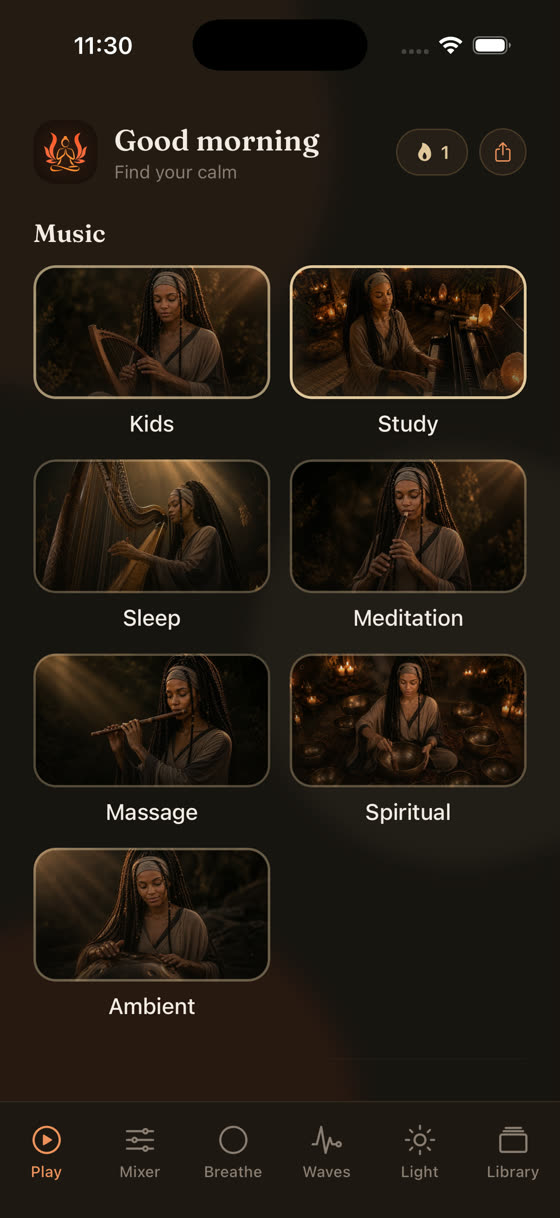
Our home screen keeps sleep, focus, meditation and calm as separate spaces, each with its own sounds, timer options and mixer, so you're never hunting through a single undifferentiated playlist to find what you were listening to last night. If you want more on what actually helps with sleep specifically, our piece on the best music for sleep goes into tempo and instrumentation in more detail.
If you use white noise for focus, not just sleep
The same looping problem shows up during the day for people who use white noise or brown noise to concentrate in an open office or a noisy flat. The stakes are lower since you're awake to notice a glitch rather than being woken by it, but the fatigue of one repeating clip is still real over a four-hour work block. A slightly richer layer, even just white noise under a very quiet, slow instrumental track, tends to hold attention longer than either alone. We've written more about tempo and arrangement for this specifically in music for focus and study, if that's the problem you're actually trying to solve.
The short version for tonight
If you're staying in Apple Music, repeat-one on a downloaded track is the best you'll get, and it's genuinely fine for a lot of people. If the click at the loop point bothers you, or one flat sound isn't masking what you need it to mask, that's a sign you want layered, purpose-built loops rather than a single song set to repeat. You can try the mixer and the full library free at myzenzone.app/get, or see the whole catalogue at myzenzone.app before you decide.
Common questions
Why does my white noise on Apple Music stop playing after a few hours?
Usually it's Low Power Mode, background app refresh being restricted, or the phone's auto-lock interacting with streaming playback over a patchy Wi-Fi or cellular signal. Downloading the track for offline playback removes the streaming dependency entirely, which fixes most of these dropouts since the phone no longer needs a live connection to keep the sound going.
Does repeat one use more data on Apple Music?
Yes, if you're streaming rather than downloading. A ten-minute track looped for eight hours re-streams roughly 48 times unless it's cached offline. On cellular data that adds up quickly, so downloading the track first is worth doing even if you only plan to use it once.
Is white noise actually proven to help with sleep?
The evidence is mixed and mostly small-scale. Some people find steady background sound helps mask disruptive noises like traffic or a snoring partner; others find no difference or prefer silence. There's no strong research proving it improves sleep quality broadly, so it's worth treating as a personal preference rather than a guaranteed fix.
What's better than white noise for sleep, if it's not working for me?
Brown noise sits lower in frequency and some people find it less harsh over hours. Layered nature sound, like soft rain under a very low drone, also tends to feel less fatiguing than a single flat tone. It's worth trying a few options rather than assuming white noise is the only category available.
Can I loop white noise for a child's room overnight safely?
Many paediatric sleep guidelines suggest keeping volume moderate and placing the speaker away from the crib or bed rather than right beside it, and using a timer rather than running sound all night at full volume. We're not a medical source, so check current guidance from a health professional for specifics around volume and duration for infants.