How to Turn On Rain Sounds on an iPhone Right Now
Go to Settings > Accessibility > Audio/Visual > Background Sounds, switch it on, then tap Sound and choose Rain. A volume slider sits underneath so you can set it quieter than your usual media volume, since Apple designed this to sit behind whatever else is playing. If you want one-tap access without digging through menus, add Background Sounds to Control Center from Settings > Control Center, then swipe down and tap the icon whenever you need it. Siri can also trigger it once the feature is enabled: "Hey Siri, play rain sounds" will start it from a locked screen.
What Apple Actually Calls Rain
Here's the part most guides skip. What you're hearing isn't a recording of actual rain. Apple's Background Sounds are synthesised, generated algorithmically in real time from a balanced noise profile, not sampled from a storm or a window. That's fine for masking a humming fridge or a noisy office, but it means the texture never really changes. No gust pushing it sideways, no shift from drizzle to downpour, none of the irregularity that makes real rain feel alive rather than mechanical. It works as a flat wash of sound. It doesn't work as music, because it isn't trying to be.
Where This Setup Falls Apart
Background Sounds is built to run underneath everything, which is convenient until you want it to be the main event. You can't layer it with a second texture, like distant thunder or a low pad, because there's only one slider and one sound at a time. There's no sleep timer attached to it specifically, so if you want it to fade out after forty minutes you're relying on your phone's general Clock timer to kill all audio, rain included. And because the loop is static, your brain adapts to it fast. A sound that's meant to help you stop noticing things eventually becomes something you stop noticing itself, which defeats the purpose if you're using it to block out a partner's snoring or street noise that actually varies.
A Mixer Instead of a Single Switch
This is where we built My Zen Zone differently. Our rain tracks are recorded, not generated, by the same in-house musician who writes everything in the library, and they sit in a proper mixer alongside other nature layers: distant surf, a low fire crackle, soft wind through trees. Each one gets its own fader, so you're not choosing a single preset but building a mix that matches the room you're actually in.
Watch what happens when you nudge rain up and wind down mid-session, rather than committing to one fixed loop for the night.
That kind of control matters more than it sounds like it should. A flat at street level needs more low-end cover than a quiet bedroom upstairs. A partner who runs warm might want fan-adjacent white noise mixed under the rain rather than music on top of it. One slider can't do that. Three or four can.
Building Your Own Rain Night
Open the app and the home screen splits sound into its own worlds rather than one long undifferentiated list, so rain and other nature sounds live where you'd expect them.
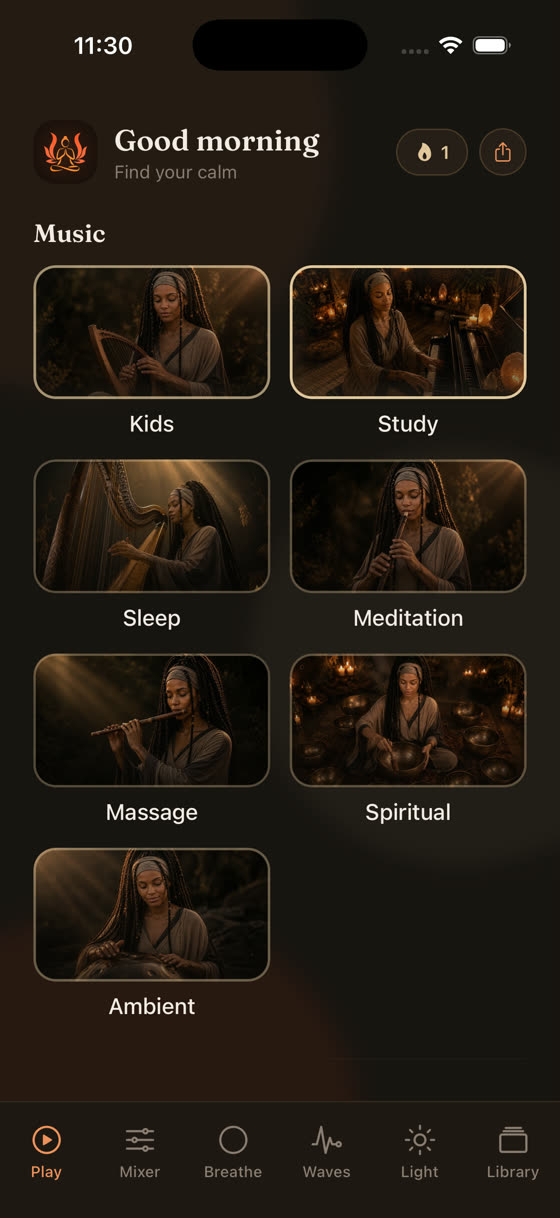
From there, drop into the mixer, set rain as your base layer, add a second texture if the room calls for it, and set the sleep timer to fade everything out over the last few minutes rather than cutting hard. A hard stop at 2am can wake some people as reliably as a loud noise would; a slow fade avoids that. If you know you'll lose signal overnight, or you just don't want the app pinging your data, download the rain tracks for offline playback first. That one setting solves more sleep interruptions than people expect, because a dropped connection mid-night is its own kind of jolt.
Rain for Focus, Not Just Sleep
Rain works for concentration too, for a specific reason: it's broadband noise, meaning it covers a wide spread of frequencies at once, which is exactly what masks a colleague's phone call or a dog barking two gardens over. Unlike a fixed tone, it doesn't sit at one pitch, so it tends to recede into the background faster than music with a melody does. We've written more on pairing ambient texture with actual focus tracks, tempos usually in the 60-80 bpm range with minimal percussion, over at music for focus and study, if rain alone isn't quite enough to hold your attention on a hard task.
The Habituation Problem Nobody Mentions
A static loop, generated or recorded, eventually stops working as effectively as it did the first week. Your auditory system is built to notice change and ignore sameness, which is useful most of the time and inconvenient here. The practical fix isn't a louder rain sound, it's a different one every so often. Our library adds new tracks every two weeks, rain recordings included, specifically so the sound behind your sleep doesn't go stale the way a single app-default loop does after a month of nightly use.
Tonight's Setup
If you just want Apple's native rain tonight, the Accessibility route above takes under a minute and costs nothing. If you've tried it for a week and found it too flat, too loud underneath a podcast, or just a bit sterile, that's the signal to move to something with actual mixing control rather than a single generated loop. You can read more on what the full library covers, including the best music for sleep if you want something with more structure than pure noise, or just get the app and build the mix in the time it would take to find the right Settings menu.
Common questions
Does Apple's rain sound drain the battery overnight?
It uses roughly the same power as any audio playback, so a full night will cost noticeable battery, especially with the screen briefly on when you set it up. Using a sleep timer so it stops after you've fallen asleep, rather than running for eight hours, keeps the drain to a fraction of that.
Can I play rain sounds and Spotify or music at the same time on iPhone?
Background Sounds is designed to duck under other audio automatically, so yes, Apple's rain will play quietly beneath Spotify or any other app. What you can't do natively is control the two independently with separate volume levels; you get one combined mix rather than a true balance between them.
Is the iPhone's built-in rain sound a loop?
It's generated algorithmically rather than looped from a single recording, so it doesn't repeat in an obvious pattern the way an old CD track would. But it's still a flat, unchanging texture over time, with none of the natural variation real rain has, which is why it can start to feel monotonous after repeated nights.
Does rain sound actually help you fall asleep, or is that just a claim?
The evidence here is mostly anecdotal rather than rigorously studied. The likeliest mechanism is masking: rain's broadband noise covers sudden sounds like traffic or a creaking house that would otherwise pull you out of drowsiness. It's reasonable to try, but no app or sound can promise it will work for you specifically.
How do I get rain sounds to stop automatically once I'm asleep?
On iPhone, the Clock app's Timer has a "Stop Playing" option under its end-of-timer sound settings, which will end any audio, including Background Sounds, after a set period. In My Zen Zone, the sleep timer is built into the player itself and fades the mix out gradually rather than cutting it abruptly.