The best offline meeting your phone can have is with itself: no bars, no wifi icon, and the session still plays start to finish without a stutter. That's the whole test. Not whether an app has an offline mode listed in its settings menu, but whether you can put the phone in airplane mode, start a 20-minute session, and get to the end of it without a buffering wheel interrupting your breath count. Most apps that advertise offline meditation fail this test in some small way, usually because only part of the experience was ever built to work without a connection.
I say this as someone who records every track in this library myself, then watches what happens to it once it leaves the studio and goes onto a phone. The music is the easy part. The hard part is making sure a guided session, its background music, and any nature sound layered under it all download together and stay in sync when there's no server to check in with. A lot of apps get this half right.
What "offline" actually needs to cover
Downloading a single meditation track is not the same as building an app that works offline. If the app streams guided voice separately from its music bed, or pulls nature sounds from a different server to save storage, one piece can drop out while the rest keeps playing. You end up with silence where the rain was, or a voice that cuts but the music carries on underneath it. It sounds like a small thing until it happens at 30,000 feet with no way to restart it.
A properly offline app downloads the whole session as one package: voice, music, and any ambient layer, all stored locally, all starting together every time. That's the bar. Anything less is partial offline, which in practice means occasional offline, which means you can't actually trust it on the one night or one flight when you need it most.
Where this actually matters
Think about when people reach for meditation audio. On a red-eye with the seatback wifi down. In a basement gym with no signal. On the Underground between stations. In a hotel room where the wifi login page never quite loads. None of these are edge cases: they're the ordinary, boring moments when a five-minute breathing session would help most, and they're exactly when streaming apps quietly fail.
There's also the overnight case, which is different again. You don't want your phone pinging a server for the next track at 3am, waking the screen, breaking a low-power routine you set up carefully before bed. A downloaded library sits on the device and plays through without the phone needing to do anything clever. We've written more on this in our piece on choosing music for sleep, but the short version is: the less your phone has to think overnight, the better it sleeps too, and so do you.
The mixer is the part most offline apps skip
Here's where most offline meditation apps quietly give up: they'll let you download a fixed playlist, but they won't let you adjust anything once it's saved to your device. You get the track as recorded, full volume, one layer, take it or leave it. That's fine if the track happens to suit your room, your mood, your tinnitus, whatever. Often it doesn't.
In My Zen Zone the mixer works offline exactly as it does online, because every layer, the music, the rain, the low drone, is downloaded as its own file with its own volume control. You can bring the rain up and the music down, or mute the music entirely and just keep a 60bpm pulse under the rain, all without a connection.
Watch that and you'll see why a fixed playlist feels thin by comparison. Three sounds, three sliders, moved live, no reload, no buffering, because nothing is being fetched from anywhere. It's already on the phone.
Guided sessions that play over the music, not instead of it
Most guided meditation apps, offline or not, treat the voice as the whole product. You press play, a teacher talks for ten minutes over a thin music bed baked permanently underneath, and that's it. If the pacing doesn't suit you, or the music grates after the third listen, there's nothing to adjust. You either tolerate it or you don't use the app.
We built guided sessions differently: the voice is one layer among several, sitting over the full music track rather than replacing it. You can bring the voice down and let the music lead, or mute the music during the spoken instruction and bring it back up for the silence afterwards. Offline, this means every layer downloads separately and stays mixable on the device, not just a single flattened file.
That recording shows a guided session with voice, music, and nature sound each running on its own play button and its own level, adjusted mid-session. It's the clearest difference between an app that happens to offer offline downloads and one built around the idea that you should be able to shape the sound, not just receive it.
What the home screen should make easy
A meditation library that runs to hundreds of tracks is only useful offline if you can find your way around it without a connection either. Search that relies on a live index, or recommendation screens that need to ping a server, break exactly when you need them least.
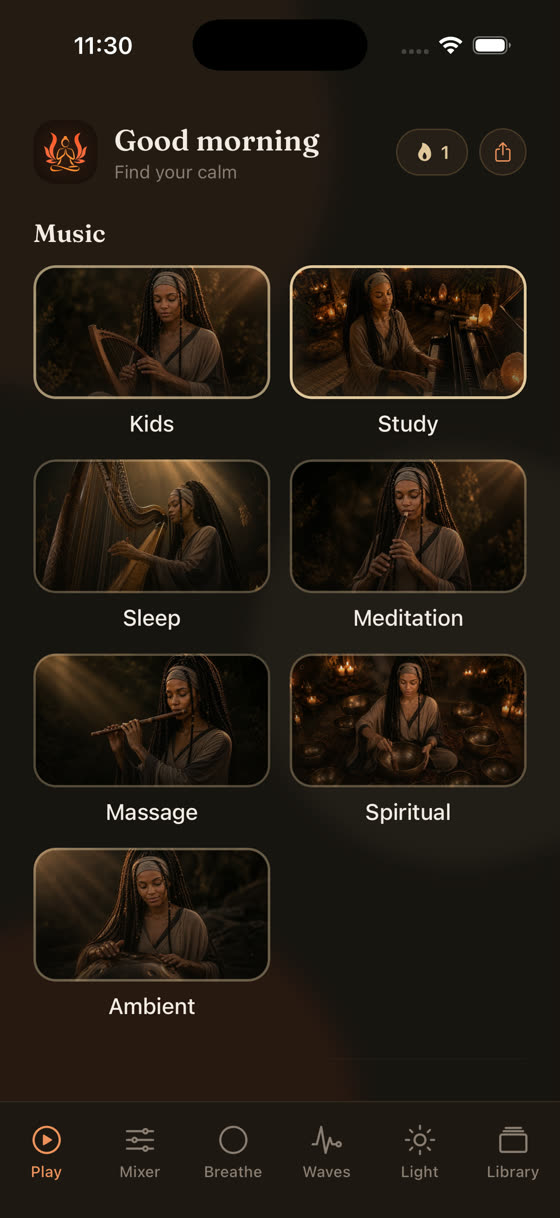
Each category in My Zen Zone, sleep, focus, meditation, calm, music, sits as its own world you can browse and download from directly, so the navigation itself doesn't depend on being online. Download a handful of tracks from each category before a trip and you've effectively built your own offline station, organised the way you actually think about your day rather than the way an algorithm thinks about engagement.
Tools worth downloading alongside the music
Meditation apps increasingly bundle in adjacent tools, and some of them are genuinely worth having offline rather than as an online extra.
- A breathing guide with a visible pattern, like the 4-6 relax rhythm, gives you something to follow when counting in your head stops working.
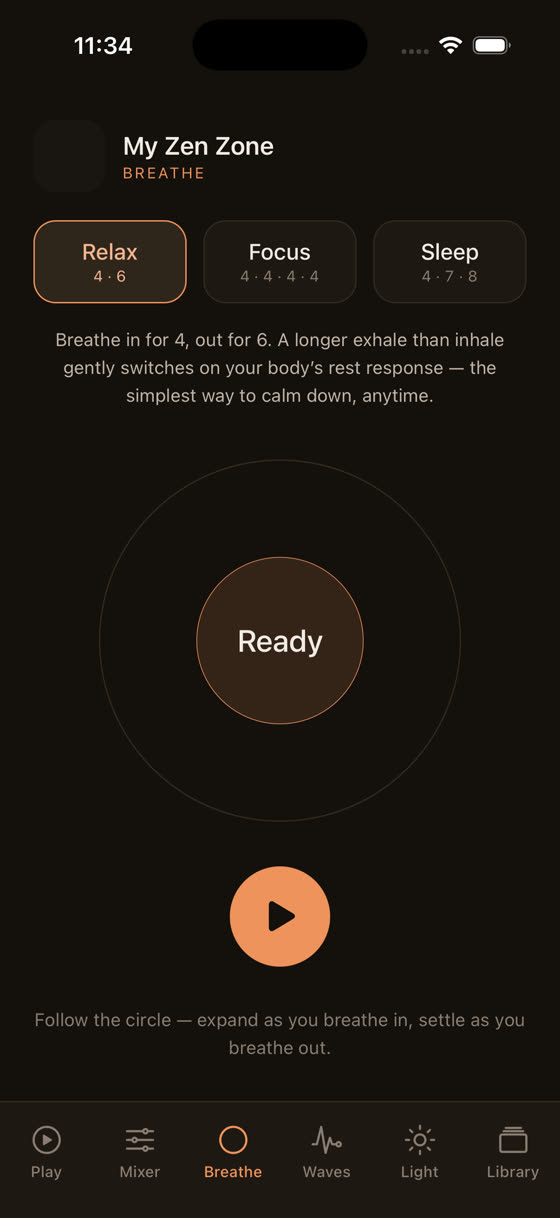
The breathing screen, set to a 4-6 relax pattern. - Brainwave tones, low binaural layers under the music, are something people either find useful or don't notice at all; the honest position is that evidence for binaural beats affecting mood or focus is thin, so treat it as one optional layer among several rather than the main event.
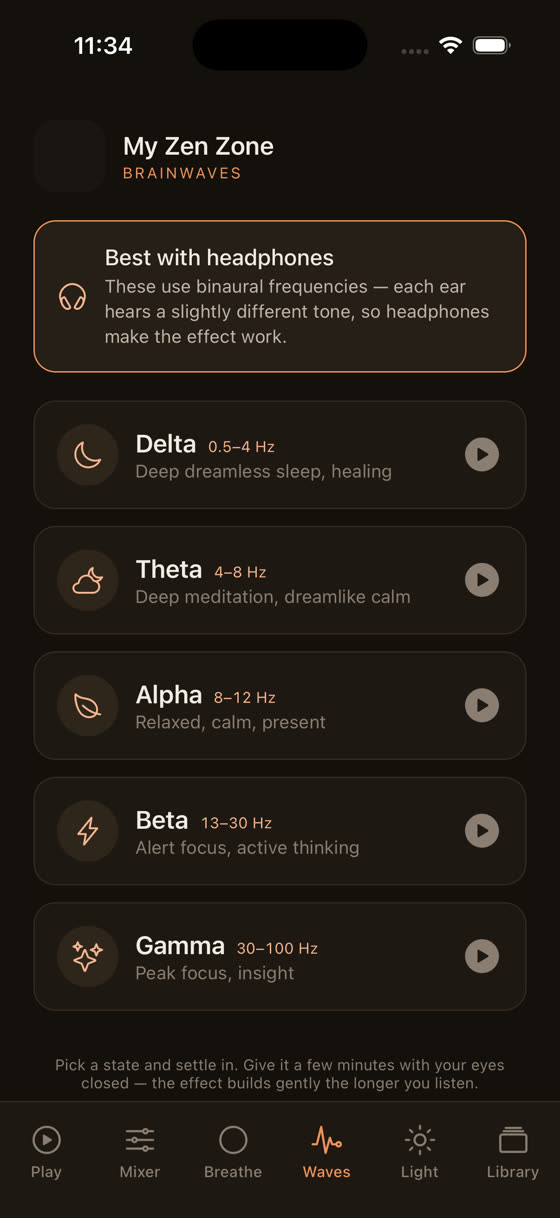
The brainwave tones screen. - A light screen for winding down, a slow dimming visual with no sudden cuts, pairs well with a sleep session once the lights are actually off.
The light screen, for winding down without a bright display.
None of these need a connection once downloaded, and none of them should be the reason you choose an app. They're worth having because they're there, not worth seeking out on their own.
What most reviews of this get wrong
A lot of "best offline meditation app" roundups test offline mode by downloading one track and pressing play once, at home, on wifi, with the phone a metre from the router. That's not a real test. It tells you the download button works. It doesn't tell you what happens on day four of a trip when you want a different session than the one you happened to save, or when the guided layer and the music layer were never actually bundled together and one silently fails without the other.
The better test is to turn on airplane mode for a full day before you judge an app. Download more than you think you'll need, mix a session the way you actually would at home, and see if the controls still respond without a spinner appearing. If a feature only works online, the app should tell you that plainly rather than letting you discover it mid-flight. New tracks are added to the library every two weeks here, which only matters if you remember to sync before you go properly offline; worth building into a habit the same way you'd check you've downloaded a film before a flight.
Getting set up before you actually need it
The useful habit is downloading in advance, not mid-crisis. Pick two or three sessions from each category you actually use, sleep, focus, calm, and save them the night before a trip or simply once a month as a refresh. If your routine is mostly about concentration rather than sleep, our focus and study piece goes into tempo and arrangement choices that help more directly than meditation voice tracks would.
A subscription also opens the full library in a browser at myzenzone.app, useful for finding and queuing tracks on a bigger screen before sending them to your phone. But the phone app is where offline actually lives, and it's worth setting up properly before the day you need it rather than during the flight when it's too late. You can start from here if you haven't already.
Common questions
Does offline mode use a lot of storage on my phone?
Individual tracks are typically a few megabytes each, so downloading twenty or thirty sessions across categories uses a modest amount of space, comparable to a handful of podcast episodes. If storage is tight, download a smaller rotating set and swap them out monthly rather than trying to save the whole library at once.
Will downloaded sessions still let me adjust the mixer offline?
Yes. Each layer in a session, music, voice, nature sound, downloads as its own file, so the mixer sliders work exactly as they do online. There's no live connection needed to change a level, because nothing is being streamed or re-fetched once it's saved to the device.
Do I need a subscription to download tracks for offline use?
A subscription is what opens the full library for download, both on the app and in the browser version. Without it you can typically preview a limited selection, but offline access to the hundreds of tracks and the fortnightly additions requires an active subscription.
Is binaural or brainwave audio actually proven to help meditation?
The evidence here is thin and mixed. Some people notice a calming effect from binaural tones, others notice nothing. Treat it as an optional extra layer in the mixer rather than a core reason to choose an app, and judge it by how it feels to you rather than by any claimed effect.
What happens if new tracks are added while I'm offline?
Nothing happens until you reconnect. New additions sit in the library waiting, and your downloaded sessions keep working exactly as before. Once you're back online, a quick sync will show the newest tracks from that two-week release cycle, ready to download for the next offline stretch.