The short answer
Nine times out of ten it's one of two things: a sleep timer you set (or that defaulted to 30 or 60 minutes without you noticing), or your phone's battery management deciding that an app playing quiet, repetitive audio in the background isn't worth the power and killing it. It's rarely the app "crashing." It's either doing exactly what it was told to do, or your operating system is doing something to it that has nothing to do with the app at all.
That distinction matters, because the fix is different depending on which one is happening to you. Chase the wrong cause and you'll spend a week fiddling with settings that were never the problem.
It's probably the timer you set and forgot about
Most white noise and sleep sound apps ship with a default timer: 30, 45, 60 minutes, something in that range. You tap play, you fall asleep, and somewhere around 2am the sound stops because the timer did its job. The trouble is that falling asleep to white noise and staying asleep on white noise are two different problems. A lot of people only solve the first one and then wonder why they're wide awake at 3am in total silence, heart rate up, wondering what went wrong.
Check the timer settings before you blame anything else. Some apps bury this in a small clock icon you only see once you've already started playback, and it's easy to assume it's set to "off" when it's actually inherited whatever you used last time. If you listen for focus during the day and for sleep at night, you may genuinely need two different timer habits, and it's worth checking each time rather than trusting muscle memory.
The real culprit: your phone's battery management
This is the one most articles skip, because it's less obvious than a timer but far more common as a nightly annoyance. Android and iOS both have aggressive background process management designed to save battery. An app that's just sitting there playing a loop of rain or static, with nothing visibly "active" on screen, looks to the OS a lot like an app that's frozen or abandoned. Phones increasingly treat long, quiet, repetitive background audio as a candidate for suspension, especially once the screen has been off for a while and the battery optimiser decides nothing important is happening.
On Android this shows up as apps getting "doze" treatment or being killed by battery-saver modes, particularly on phones from manufacturers who run their own aggressive power management on top of stock Android. On iOS it's less common because Apple handles background audio more consistently, but Low Power Mode and certain focus or downtime settings can still interrupt playback, especially overnight when the phone is also trying to conserve charge for the morning.
None of this is a flaw in the white noise app itself. It's a fight between what you want the phone to do and what the phone's power management is trying to do on your behalf, usually without telling you.
Bluetooth speakers add their own layer of trouble
If you're playing through a Bluetooth speaker rather than the phone's own speaker, there's a second failure point. Many budget and mid-range Bluetooth speakers have an auto-off feature that triggers after a period of silence, and the problem is that white noise isn't always continuous at the waveform level. A track with a quiet fade between loops, or a stretch of very low-level ambience, can register as "silence" to a speaker's power-saving circuit even though you can hear it fine. The speaker switches itself off mid-track, and it has nothing to do with your phone or the app at all.
This is one reason a track's structure matters more than people assume. A loop built with an audible dip to near-zero and then a hard cut back up is far more likely to trigger an auto-off than a loop composed to breathe gently and never fully drop out.
Why a single looping track makes the problem worse
A lot of white noise apps give you one sound, looped on repeat for eight hours. That's fine until the loop has an audible seam, a slightly too-quiet patch, or a transition that confuses a phone or speaker's power logic. It's also just less pleasant to sleep through than something with texture. We approach this differently: rather than one static noise, you layer two or three sounds yourself, rain at one level, distant thunder lower, a soft drone underneath, and balance them until it sounds like a room rather than a machine.
Watching the levels move live is the fastest way to understand why this matters. A mix with three independent layers rarely has the kind of total silence that trips a Bluetooth speaker's auto-off, because even when one sound dips, another is still carrying the room. You get a richer sound and, as a side effect, fewer of the dropouts that plague single-track loops.
What a mid-sleep cutout actually does to you
There's decent evidence that consistent background sound can help some people fall asleep faster by masking sudden noises, a door, traffic, a partner shifting in bed, though it's worth saying plainly that the research here is mixed and nobody should expect it to work the same way for everyone. What's less talked about is the cost of the sound stopping unexpectedly partway through the night. Your brain has settled into a steady auditory baseline, and when that baseline vanishes without warning, the contrast itself can be what wakes you, not the silence on its own. It's a version of the same reason a radiator clicking off wakes people who'd slept fine while it was running.
If you want more background on choosing sound for sleep in the first place, including which tempos and textures tend to work better than others, our piece on best music for sleep goes into that in more detail.
What to actually do about it tonight
Start by checking three things. First, the in-app timer, set it to "off" or to the full length of your expected sleep rather than a short default. Second, your phone's battery optimisation settings, most Android phones let you exempt specific apps from aggressive background management, usually under Settings, Battery, and then a list of apps with power controls. Third, if you're on a Bluetooth speaker, test whether the same track plays all night through wired or phone speakers instead; if it does, the speaker's auto-off is your problem, not the software.
Downloading tracks for offline playback also removes one variable entirely, since the app isn't relying on a live stream that can stutter on patchy wifi and get flagged as inactive. It's a small habit, but worth building before bed rather than discovering the gap at 1am.
How we've built this to avoid it
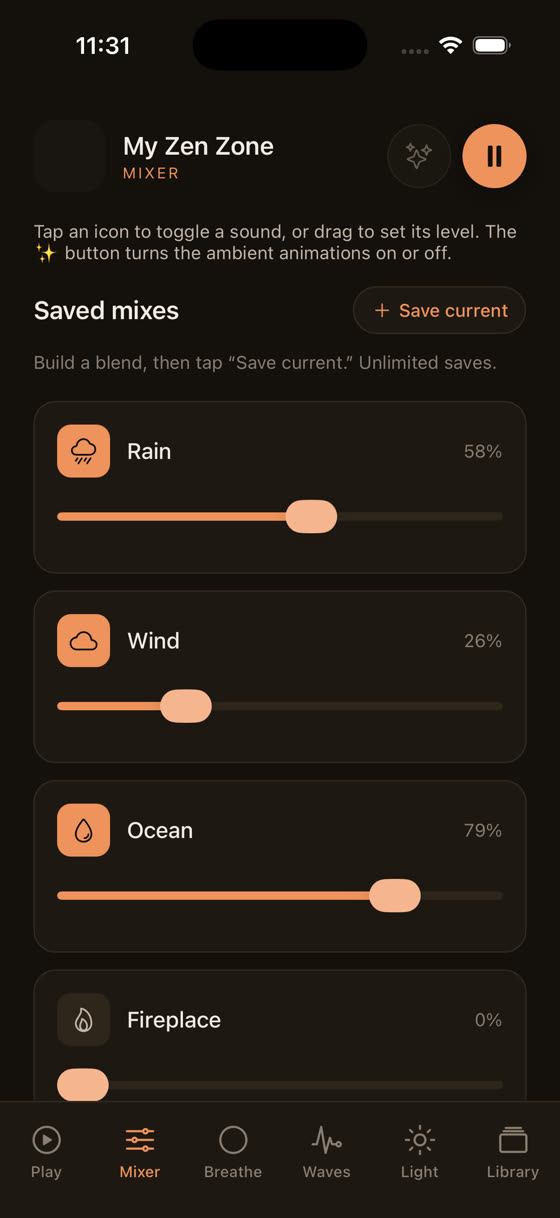
The mixer screen above is the core of how we think about this problem. Instead of one looping file, you build your own mix from rain, waves, a soft drone, or one of the fortnightly new tracks, each on its own level, each downloadable for offline listening so there's no dependency on a live connection holding steady through the night. The sleep timer is there if you want it, but plenty of people just let a long, layered mix run its course, since it was composed to loop without an audible seam in the first place.
If you're choosing between a free white noise app and something built with sleep specifically in mind, that's really the difference worth paying attention to, not features for their own sake but fewer of the small technical gaps that end up waking you at 3am. You can see the full range, including the focus and meditation sides of the library, at myzenzone.app, or go straight to /get if you'd rather just try it tonight.
Common questions
Does white noise stop automatically after a set time?
Only if a timer is set, either by you or as an app default. Many apps default to 30 or 60 minutes without making it obvious. Check the timer icon before you sleep, and set it to "off" or to your full expected sleep length if you want sound running all night.
Why does my Bluetooth speaker cut out during white noise but not with other audio?
Many Bluetooth speakers have an auto-off feature triggered by silence. White noise loops sometimes dip to very low volume between cycles, which the speaker reads as silence even though it's still technically audible. Try the same track through wired or phone speakers to confirm the speaker, not the app, is the cause.
Does Low Power Mode affect background sound apps?
Yes, on both iOS and Android, power-saving modes can restrict background processes, including audio apps that haven't been specifically exempted. If sound keeps cutting out overnight, check your phone's battery settings and look for an option to exclude your sleep app from power optimisation.
Will downloading tracks instead of streaming fix the dropouts?
It removes one common cause. Streaming over patchy wifi can stall, and a stalled stream sometimes gets treated by the OS as an inactive app and closed. Downloading tracks for offline playback takes that variable out entirely, which is worth doing before bed rather than troubleshooting at 3am.
Is it bad for sleep if the sound stops partway through the night?
Evidence here is limited, but a sudden shift from steady background sound to silence can be jarring enough to wake some people, similar to how a radiator clicking off wakes light sleepers. It's not dangerous, just worth avoiding if consistent sound is part of your routine.